Good morning/afternoon/evening, depending on when you see this message (if I'm lucky enough to read another one of mine), I wanted to ask you about adding "mods" to the game. I want to create a mod for Ponyvania, since it seems it won't be updated anymore (with new content like bosses, enemies, areas, etc.). I wanted to create a mod to offer a new experience and places to explore, but the wiki mentions something called "undertalemodtool" that can modify the game. I tried it, and it's very complicated, even changing the sprites. I wanted to ask if there are any good alternatives for creating a mod that adds new things.
(Something I want to emphasize is that I'm not trying to steal the game or anything like that; I have a lot of respect for this game and I don't see myself doing that to a game as good as Ponyvania.)
I did not create the game with mods in mind and I was not a good programmer when I started development so many things are hard-coded and difficult to change. That being said, I don't know of any good alternatives for creating mods, but I'm considering releasing the source code in a few years to let moders play around with it.
Latest Win update has my PC freaking out. It thinks the Uninstaller is a Trojan. The game also wasn't updating my save as I progressed. Lost 3hrs of castle clearing. I'm not sure what the deal it.
I downloaded this game a few days ago and only got to play it once, a few minutes ago I got a virus protection notice that in the files of Ponyvania came a severe trojan. What's up with that?
It's a false-positive. I've been assured that GameMaker runtime does not contain any viruses, but it is sometimes flagged as a trojan by aggressive antivirus software. This is probably because I haven't submitted the game for certification from any verification service, so it can be seen as unverified and suspicious by some antivirus software.
Hey, I need help with something. The problem I have is that I already have a save file (with my brother) But it's saved on his computer, the problem is that his PC is very slow and we can't play properly because of this. I've been looking for the save file to transfer it from his PC to mine, but I can't find it anywhere. Could you tell me if this is possible and/or where the save file is located? (By the way, great game, it brought my brother and me back together after so long without playing anything together)
Yes, I saw it. There are the sound effects, the game information, and the uninstaller. But there's no file called "saved," "game 1," or anything like that. Am I experiencing a bug? (just in case, yes, I saved my game on my brother's computer, with the moon of the statues)
Edit: Never mind, I found it! Thank you so much for your help and thank you for this wonderful game. I hope to see an update soon <3
The game does have a steep learning curve and can be unforgiving at times, but all attacks can be evaded by all races, it just takes a little time to recognize the attack patterns.
so juststarted the game and the window size is small, like, really small and i dont have any way in the options to make it bigger, any help? Idk if this is a bug or something else
Oh, I absolutely love this project! I’ve played through it several times, ever since the time when the Bear Constellation was the final chapter. Now that I’ve remembered the game again, I’m so happy that after all these years, the developer actually managed to finish it and didn’t abandon the project! Thank you so much for all your hard work!

← Return to game
Comments
Log in with itch.io to leave a comment.
Good morning/afternoon/evening, depending on when you see this message (if I'm lucky enough to read another one of mine), I wanted to ask you about adding "mods" to the game. I want to create a mod for Ponyvania, since it seems it won't be updated anymore (with new content like bosses, enemies, areas, etc.). I wanted to create a mod to offer a new experience and places to explore, but the wiki mentions something called "undertalemodtool" that can modify the game. I tried it, and it's very complicated, even changing the sprites. I wanted to ask if there are any good alternatives for creating a mod that adds new things.
(Something I want to emphasize is that I'm not trying to steal the game or anything like that; I have a lot of respect for this game and I don't see myself doing that to a game as good as Ponyvania.)
I did not create the game with mods in mind and I was not a good programmer when I started development so many things are hard-coded and difficult to change. That being said, I don't know of any good alternatives for creating mods, but I'm considering releasing the source code in a few years to let moders play around with it.
Latest Win update has my PC freaking out. It thinks the Uninstaller is a Trojan. The game also wasn't updating my save as I progressed. Lost 3hrs of castle clearing. I'm not sure what the deal it.
I downloaded this game a few days ago and only got to play it once, a few minutes ago I got a virus protection notice that in the files of Ponyvania came a severe trojan. What's up with that?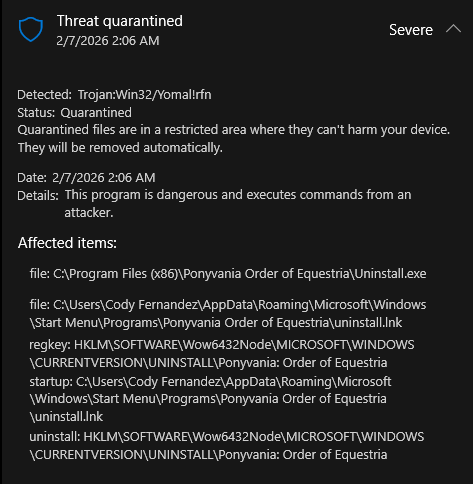
It's a false-positive. I've been assured that GameMaker runtime does not contain any viruses, but it is sometimes flagged as a trojan by aggressive antivirus software. This is probably because I haven't submitted the game for certification from any verification service, so it can be seen as unverified and suspicious by some antivirus software.
Hey, I need help with something. The problem I have is that I already have a save file (with my brother) But it's saved on his computer, the problem is that his PC is very slow and we can't play properly because of this. I've been looking for the save file to transfer it from his PC to mine, but I can't find it anywhere. Could you tell me if this is possible and/or where the save file is located? (By the way, great game, it brought my brother and me back together after so long without playing anything together)
Thanks for playing! Save files are located in ...USERNAME\AppData\Local\Ponyvania
Yes, I saw it. There are the sound effects, the game information, and the uninstaller. But there's no file called "saved," "game 1," or anything like that. Am I experiencing a bug? (just in case, yes, I saved my game on my brother's computer, with the moon of the statues)
Edit: Never mind, I found it! Thank you so much for your help and thank you for this wonderful game. I hope to see an update soon <3
Do i need to transfer my save to the new update? Idk how this works :v
Sorry for the late reply. Save files should not be deleted when updating but you might want to make backups just in case.
Playing this game... It is really unforgiving, literally Gilda and the Mantacore are complete assholes if your not used to the movement.
The game does have a steep learning curve and can be unforgiving at times, but all attacks can be evaded by all races, it just takes a little time to recognize the attack patterns.
so juststarted the game and the window size is small, like, really small and i dont have any way in the options to make it bigger, any help? Idk if this is a bug or something else
Press F4 to change the window size. Please check the included Read Me file for more information.
Just remembering this classic!
Oh, I absolutely love this project! I’ve played through it several times, ever since the time when the Bear Constellation was the final chapter. Now that I’ve remembered the game again, I’m so happy that after all these years, the developer actually managed to finish it and didn’t abandon the project!
Thank you so much for all your hard work!
Thank you! I really appreciated.
It was only with everyone's support for the project that I was able to see it through to the end.
Sorry to interrupt but i feel dumb, install on computer small screen like postcard cannot make bigger(full window mode) no matter what :(
Try pressing F4, please check the Read Me for more info.
Wow, this is an amazing project--mad respect!